Authentication Issues
Issues related to LDAP authentication, user login, OpenLDAP service, and TLS certificate errors.
LDAP Login Fails After User Creation
Symptom
After creating a user via LDIF import or Omnia's user management, SSH login fails:
ssh newuser@compute-01
# Output: Permission denied (publickey,gssapi-keyex,gssapi-with-mic)
# Or: su: user newuser does not exist
id newuser
# Output: id: 'newuser': no such user
Cause
LDAP login failures have multiple common causes:
- Whitespace or encoding in LDIF: Invisible trailing spaces/tabs in LDIF file corrupt attribute values
- Missing POSIX attributes: User entry lacks required uidNumber, gidNumber, homeDirectory, or loginShell
- Wrong objectClass: User created with inetOrgPerson but missing posixAccount objectClass
- SSSD cache stale: SSSD on compute nodes has cached the "user not found" response
- Incorrect base DN: User created in wrong OU/tree — not under the search base configured in SSSD
Resolution
Diagnostic Steps
-
Verify user exists in LDAP:
Run on: auth serverldapsearch -x -H ldap://localhost -b "dc=omnia,dc=local" "(uid=newuser)" -
Check for whitespace in LDIF:
Run on: auth servercat -vet /path/to/user.ldif | grep -E '\s$' -
Verify POSIX attributes:
Run on: auth serverldapsearch -x -H ldap://localhost -b "dc=omnia,dc=local" "(uid=newuser)" \ objectClass uidNumber gidNumber homeDirectory loginShell -
Check SSSD cache on compute node:
Run on: compute nodesssctl user-show newuser -
Verify base DN matches SSSD config:
Run on: compute nodegrep ldap_search_base /etc/sssd/sssd.conf
Fix by Cause
1. Whitespace in LDIF
sed -i 's/[[:space:]]*$//' /path/to/user.ldif
ldapmodify -x -H ldap://localhost -D "cn=admin,dc=omnia,dc=local" -W -f /path/to/user.ldif
2. Missing POSIX attributes
ldapmodify -x -H ldap://localhost -D "cn=admin,dc=omnia,dc=local" -W <<EOF
dn: uid=newuser,ou=People,dc=omnia,dc=local
changetype: modify
add: objectClass posixAccount
add: uidNumber 10001
add: gidNumber 10001
add: homeDirectory /home/newuser
add: loginShell /bin/bash
EOF
3. SSSD cache stale
sssctl cache-remove
systemctl restart sssd
4. Wrong objectClass or base DN: Re-create user with correct attributes in proper OU under the LDAP search base.
OpenLDAP Login Fails
Symptom
OpenLDAP login fails.
Cause
Stale SSH key.
Resolution
ssh-keygen -R <hostname>
User Login Fails on Cluster Nodes
Symptom
Users cannot log in to Slurm compute nodes or login nodes via SSH. Login attempts fail with Permission denied, please try again. even though the user exists in LDAP and can authenticate on the auth server directly.
Cause
- The LDAP client (
sssdornslcd) is not running on the target node. - The LDAP client is configured with the wrong server URI or search base.
- NSS (Name Service Switch) is not configured to use LDAP.
- The user's home directory does not exist on the target node.
Resolution
-
Check SSSD status on the target node:
Run on: compute nodesystemctl status sssdIf not running:
Run on: compute nodesystemctl start sssd -
Verify SSSD configuration:
Run on: compute nodecat /etc/sssd/sssd.conf | grep -E 'ldap_uri|ldap_search_base' -
Test user lookup via NSS:
Run on: compute nodegetent passwd <username>If the user does not appear, SSSD or NSS is misconfigured.
-
Check if the home directory exists:
Run on: compute nodels -la /home/<username>If it does not exist, enable automatic home directory creation:
Run on: compute nodeauthconfig --enablemkhomedir --update -
Clear the SSSD cache and restart:
Run on: compute nodesss_cache -E systemctl restart sssd
User Login Through OpenLDAP Fails
Symptom
User login through OpenLDAP fails on cluster nodes. Commands such as ssh ldapuser@node, su - ldapuser, or id ldapuser return no user or authentication errors.
Cause
Possible causes include:
- OpenLDAP container is not running
- SSSD is not running or is misconfigured
- TLS/SSL certificate issue
- Incorrect LDAP connection type configured
- Network connectivity issue to LDAP server
- Stale SSH host key when connecting to OIM or container
Resolution
-
Check if the OpenLDAP container is running:
Run on: OIM hostpodman ps -a | grep omnia_authIf the container is not running, start it:
Run on: OIM hostsystemctl start omnia_auth.serviceAlternatively, re-run prepare_oim.yml with OpenLDAP enabled in software_config.json.
-
Verify SSSD status and configuration on the login or compute node:
Run on: compute nodesystemctl status sssdIf SSSD is not running or misconfigured, restart it:
Run on: compute nodesystemctl restart sssdVerify that
/etc/sssd/sssd.confhas the correct settings forldap_uri,ldap_search_base,ldap_default_bind_dn, andldap_default_authtok. -
Check for TLS/SSL certificate issues:
Verify that the certificate file exists:
Run on: compute nodels -la /etc/openldap/certs/ldapserver.crtEnsure the certificate matches the one used by the omnia_auth container. If there is a mismatch, re-copy certificates from the shared NFS path (
/opt/omnia/omnia/openldap/certsor the configurednfs_server_share_path) and restart SSSD:Run on: compute nodesystemctl restart sssd -
Verify LDAP connection type consistency:
The default connection type is TLS on port 389. If security_config.yml sets
ldap_connection_type: SSL, SSSD expectsldaps://<ldap_server_ip>:636. Verify that security_config.yml and sssd.conf are consistent regarding the connection type and port. -
Test network connectivity to the LDAP server:
Run on: compute nodeping <ldap_server_ip> ldapsearch -x -H ldap://<ldap_server_ip> -b <ldap_search_base>If connectivity fails, verify firewall rules and ensure the LDAP server IP is reachable from the affected node.
-
Check for stale SSH host keys:
If the actual failure is an SSH connection to the OIM or omnia_core container (not an OpenLDAP bind), the error may indicate a stale SSH host key:
Expected outputWARNING: REMOTE HOST IDENTIFICATION HAS CHANGED!This occurs when the OIM or container was reprovisioned, leaving a stale entry in
~/.ssh/known_hosts. Remove the stale key:Run on: compute nodessh-keygen -R <hostname>Or for a specific port:
Run on: compute nodessh-keygen -R "[localhost]:<port>"Then re-scan the host key:
Run on: compute nodessh-keyscan <hostname> >> ~/.ssh/known_hosts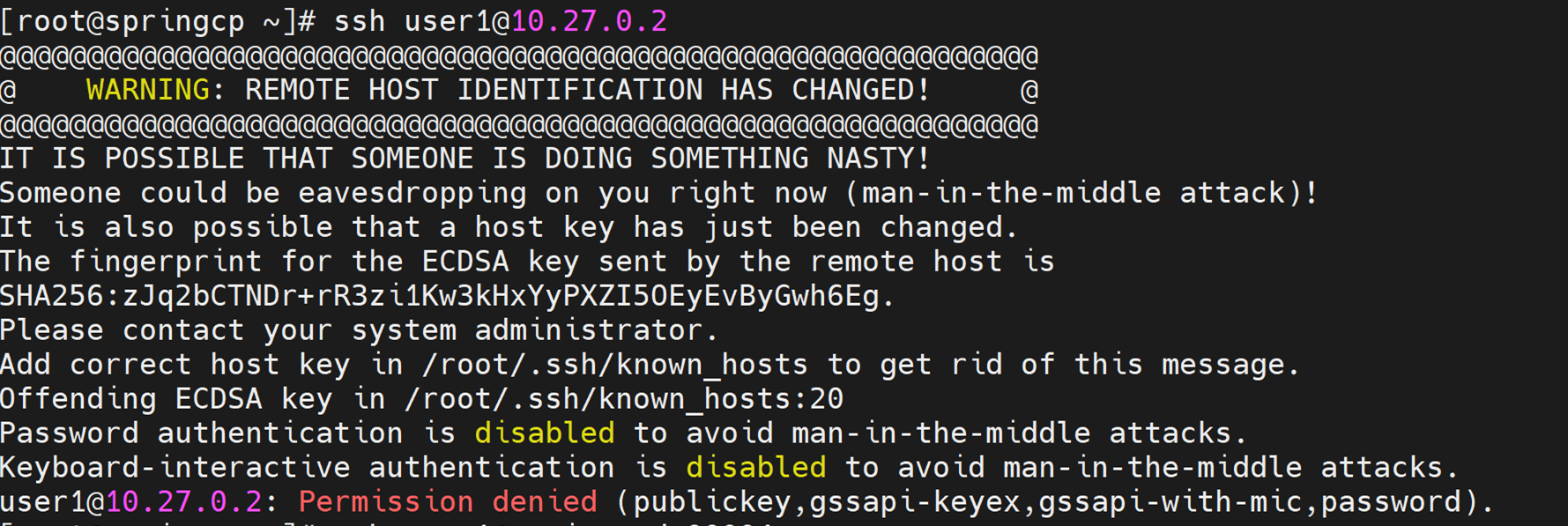
Certificate Errors
Symptom
LDAP or other services fail with TLS certificate errors:
TLS: peer cert untrusted or revoked
SSL routines:ssl3_get_server_certificate:certificate verify failed
Cause
- The CA certificate used by step-ca is not installed on the client node.
- The service certificate has expired.
- The certificate's Subject Alternative Name (SAN) does not match the hostname or IP being used to connect.
Resolution
-
Check the certificate expiry:
Run on: auth serveropenssl x509 -in /etc/step/certs/server.crt -noout -dates step certificate inspect /etc/step/certs/server.crt --short -
If expired, renew the certificate:
Run on: auth serverstep ca renew /etc/step/certs/server.crt /etc/step/certs/server.key -
Verify the CA certificate is installed on client nodes:
Run on: compute nodels /etc/pki/ca-trust/source/anchors/If the CA cert is missing, copy it and update the trust store:
Run on: OIM hostscp /etc/step/certs/root_ca.crt <client_node>:/etc/pki/ca-trust/source/anchors/ ssh <client_node> update-ca-trust -
Verify the SAN matches the connection target:
Run on: auth serveropenssl x509 -in /etc/step/certs/server.crt -noout -ext subjectAltNameIf the SAN does not include the correct hostname or IP, reissue the certificate:
Run on: auth serverstep ca certificate <hostname> /etc/step/certs/server.crt \ /etc/step/certs/server.key --san <hostname> --san <ip_address> -
Restart services after updating certificates:
Run on: compute nodesystemctl restart sssd
Info
- Deploy External LDAP -- External LDAP deployment guide.