Cluster DNS
Cluster DNS provides dynamic hostname resolution for Omnia-managed cluster nodes using CoreDNS-based DNS services instead of static /etc/hosts file management. This feature eliminates O(N) SSH-based hosts file updates during provisioning and provides automatic hostname resolution for newly inventoried nodes without requiring playbook re-runs.
What Is Cluster DNS
Cluster DNS is a DNS-based hostname resolution system that leverages coresmd, the CoreDNS instance already deployed as part of the OpenCHAMI stack on the Omnia Infrastructure Manager (OIM) node. coresmd queries the OpenCHAMI State Manager Daemon (SMD) inventory every 30 seconds and automatically generates forward A records for all inventoried nodes.
When enabled, compute nodes resolve hostnames via DNS queries to the OIM instead of reading from local /etc/hosts files. This provides a single source of truth for hostname-to-IP mappings and eliminates the need for manual hosts file synchronization across the cluster.
DNS Ownership Boundaries
Omnia Cluster-Scoped DNS
Omnia manages and is responsible for the following DNS aspects:
Cluster Node Resolution
- Forward (A record) hostname resolution for all compute, Slurm controller, login, and Kubernetes nodes
- Dynamic DNS record generation from OpenCHAMI SMD inventory via coresmd
- DNS zone serving for the cluster domain (e.g.,
hpc.cluster) - Cloud-init-based
/etc/resolv.confconfiguration on compute nodes - Kubernetes CoreDNS ConfigMap patching to forward cluster domain queries to OIM coresmd
Admin Network DNS Forwarding
- coresmd forwards non-cluster DNS queries (e.g.,
google.com,internal.company.com) to upstream DNS servers configured inadmin_network.dnsfrominput/network_spec.yml - This enables cluster nodes to resolve external and enterprise DNS names through the OIM
Enterprise DNS (Site Administrator Responsibility)
The site network administrator retains responsibility for:
Enterprise DNS Infrastructure
- Upstream DNS server configuration and maintenance (specified in
admin_network.dns) - Enterprise-wide DNS zones and records (e.g.,
company.com, internal services) - DNS security policies (DNSSEC, filtering, etc.)
- External DNS resolution for non-cluster resources
Out-of-Band (OOB) Network DNS
- BMC/iDRAC hostname resolution on the OOB management network
- DNS configuration for switch management interfaces
- Any DNS services running on networks outside the Omnia-managed admin network
InfiniBand Fabric DNS
- InfiniBand-specific hostname records (e.g.,
nid001-ib.cluster.domain) - Subnet Manager (SM) hostname resolution
- Fabric management tool DNS integration
Note
Omnia does not manage InfiniBand fabric DNS. MPI over InfiniBand uses UCX auto-detection for transport selection and does not rely on DNS for IB fabric discovery.
Input Validation
When dns_enabled is set to true in provision_config.yml, Omnia performs an early input validation check during provision.yml execution. All hostnames in the PXE mapping file must follow the NID format (e.g., nid001, nid002, nid00001).
Hostname Format Requirements (dns_enabled: true)
- All hostnames must match the pattern:
nidfollowed by one or more digits (e.g.,nid001,nid002,nid00001) - Custom hostnames (e.g.,
headnode,compute1,slurm-ctrl) are not supported when DNS is enabled - The validation runs before any provisioning tasks execute, providing an early and clear error message
Validation Error
If any hostname in the PXE mapping file does not follow the NID format when dns_enabled is true, provisioning fails with the following error:
When dns_enabled is true in provision_config.yml, all hostnames in the PXE mapping file
must follow the NID format (e.g., nid001, nid00001). Custom hostnames are not supported
with DNS enabled. Either set dns_enabled to false to use custom hostnames with /etc/hosts,
or update the hostnames to use the NID format.
Invalid hostnames: 'headnode' (row 2), 'compute1' (row 3)
NID-to-CoreDNS Alignment
CoreDNS generates DNS records from SMD node IDs using the pattern {cluster_shortname}{zero_padded_id}.{cluster_domain} (e.g., nid001.hpc.cluster for node ID 1). The NID assigned in SMD is determined by the order of nodes sorted by xname in the generated nodes.yaml. To ensure correct DNS resolution, hostnames in the PXE mapping file should match the NID values that will be assigned based on xname sort order.
Warning
If hostnames in the PXE mapping file do not match the NID values assigned by SMD (based on xname sort order), DNS resolution will return incorrect IP addresses. For example, if hostname nid001 is assigned to a node that gets NID 2 in SMD, CoreDNS will resolve nid001 to a different node's IP address. Ensure that the numbering in your PXE mapping file hostnames matches the expected xname sort order.
DNS Architecture
Legacy Behavior: /etc/hosts (dns_enabled: false)
By default (dns_enabled: false), Omnia uses static /etc/hosts file management. All hostnames (NID-based or custom) are supported in this mode:
At Boot (Cloud-Init)
- Cloud-init renders the
ip_name_mapdictionary (hostname-to-IP mapping for all cluster nodes) into/etc/hostsas append entries - The mapping is a snapshot at provisioning time and does not update if nodes are added or removed later
OIM /etc/hosts Update
- During
provision.ymlexecution, theupdate_hosts.ymltask iterates through every entry in the PXE mapping file - Removes stale entries and adds fresh
<ADMIN_IP> <HOSTNAME>lines - This is an O(N) shell loop that takes several minutes for large clusters
Slurm Node /etc/hosts Update
- The
update_hosts_munge.ymltask SSHes into each reachable Slurm node - Removes stale entries and adds fresh
<IP> <hostname>entries for all current nodes - This is an O(N x M) operation (N nodes visited, M lineinfile operations per node)
Limitations
- New nodes added after boot are not resolvable until the node is reprovisioned or the playbook re-pushes
/etc/hosts - Removed nodes leave stale entries until the next playbook run
- Inconsistent
/etc/hostsacross the cluster due to race conditions or unreachable nodes
CoreDNS Behavior (dns_enabled: true)
When dns_enabled: true, Omnia uses dynamic DNS resolution. All hostnames must follow the NID format (validated during provisioning):
At Boot (Cloud-Init)
- Cloud-init writes
/etc/resolv.confwith the OIM IP as the nameserver and the cluster domain as the search domain - Does not append any peer entries to
/etc/hosts - The
search <domain_name>directive enables short-name resolution (e.g.,nid001resolves asnid001.hpc.cluster) - All hostname resolution is handled by CoreDNS via coresmd
OIM /etc/hosts Update — Skipped
- The
update_hosts.ymltask detectsdns_enabled: trueand skips the entire/etc/hostsupdate block - Only the localhost entry is ensured
Slurm Node /etc/hosts Update — Skipped
- The
update_hosts_munge.ymltask detectsdns_enabled: trueand skips the entire SSH-based/etc/hostsmanagement block - Munge key distribution and Slurm service restart logic continue to function normally
Firewall Configuration
- Port 53 (TCP and UDP) is opened on the OIM node firewall unconditionally during OpenCHAMI deployment
- This ensures CoreDNS is reachable from all compute nodes regardless of when
dns_enabledis configured
Behavior Summary
| dns_enabled | Hostnames | Behavior |
|---|---|---|
true |
All NID format (nid001, nid002, ...) |
Validation passes. /etc/resolv.conf points to CoreDNS. /etc/hosts is not populated with peer entries. All resolution via DNS. |
true |
Any non-NID (headnode, compute1) |
Validation fails with error message. Provisioning stops. User must fix hostnames or set dns_enabled to false. |
false (default) |
Any format | /etc/hosts populated with all hostnames. /etc/resolv.conf is not modified. Standard /etc/hosts-based resolution. |
DNS Resolution Flow
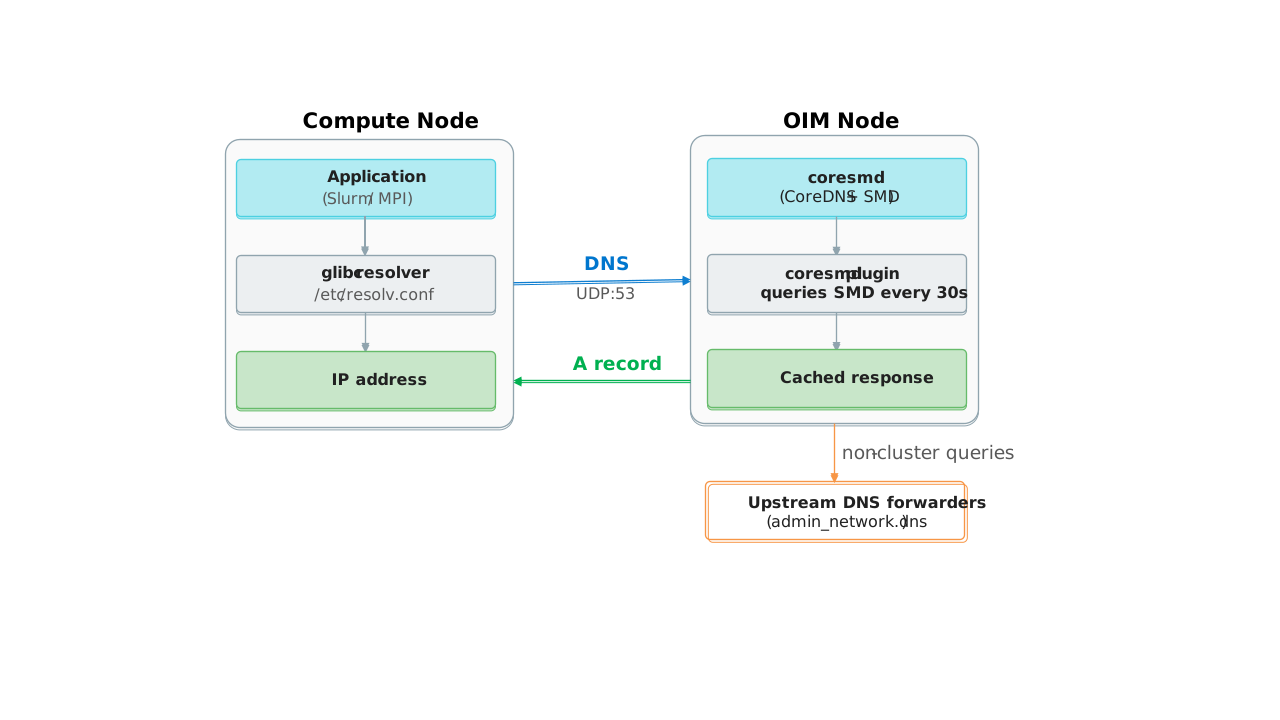
coresmd Record Generation
- Every 30 seconds, coresmd queries SMD for the current node inventory
- For each node, it creates a record:
{cluster_shortname}{zero_padded_id}.{cluster_domain} -> <admin_ip> - Example: Node ID 1 with
cluster_shortname=nid,cluster_nidlength=3,cluster_domain=hpc.clusterproduces:nid001.hpc.cluster -> 172.16.0.1 - Non-cluster queries are forwarded to upstream DNS servers from
admin_network.dns
High Availability Behavior
Current Implementation
Single coresmd Instance
- coresmd runs as a single container on the OIM node
- No VIP failover or load balancing is currently implemented
- If the OIM node or coresmd container is down, DNS queries from compute nodes fail
Failure Mode
- DNS queries time out after 1 second (
options timeout:1), retry once (options attempts:2), then fail - All hostname resolution fails until coresmd is restored
- Slurm jobs cannot start; running MPI jobs that need to resolve new peers will fail
- Already-connected TCP sessions (e.g., active MPI communications) continue until a new resolution is needed
Mitigation
- Restart coresmd container on the OIM node
- Future HA enhancement will provide VIP failover (deferred to OIM HA specification)
Warning
In the current implementation, the OIM node is a single point of failure for DNS resolution. For production deployments requiring high availability, ensure the OIM node is deployed with appropriate redundancy and monitoring.
Fabric-Aware Resolution
Ethernet (Admin/PXE Network)
Supported Resolution
- coresmd returns the admin/PXE IP address for each node from SMD
- This is the IP address used for Slurm hostname resolution and cluster management
- MPI over Ethernet uses this IP for peer discovery
Record Format
- Forward A records only:
nid001.hpc.cluster -> 172.16.0.1 - No reverse DNS (PTR) records are generated
- No fabric-specific suffixes (e.g.,
-ib) are supported
InfiniBand Fabric
Not Supported
- coresmd does not generate InfiniBand-specific DNS records
- No
nid001-ib.hpc.clusterrecords are available - Reverse DNS for IB addresses is not provided
MPI Behavior
- MPI implementations typically use UCX auto-detection for InfiniBand transport selection
- UCX discovers IB interfaces directly via the RDMA/Verbs API, not via DNS
- Explicit IB DNS records are rarely required for MPI job execution
Workaround
- If your MPI implementation requires IB-specific hostnames, configure them manually in
/etc/hostson the relevant nodes - This is a site-specific configuration outside of Omnia's automated management
Interaction with admin_network.dns
Upstream DNS Forwarding
Configuration
- Upstream DNS servers are specified in
input/network_spec.ymlunderadmin_network.dns - These servers are used by coresmd to forward non-cluster DNS queries
Query Flow
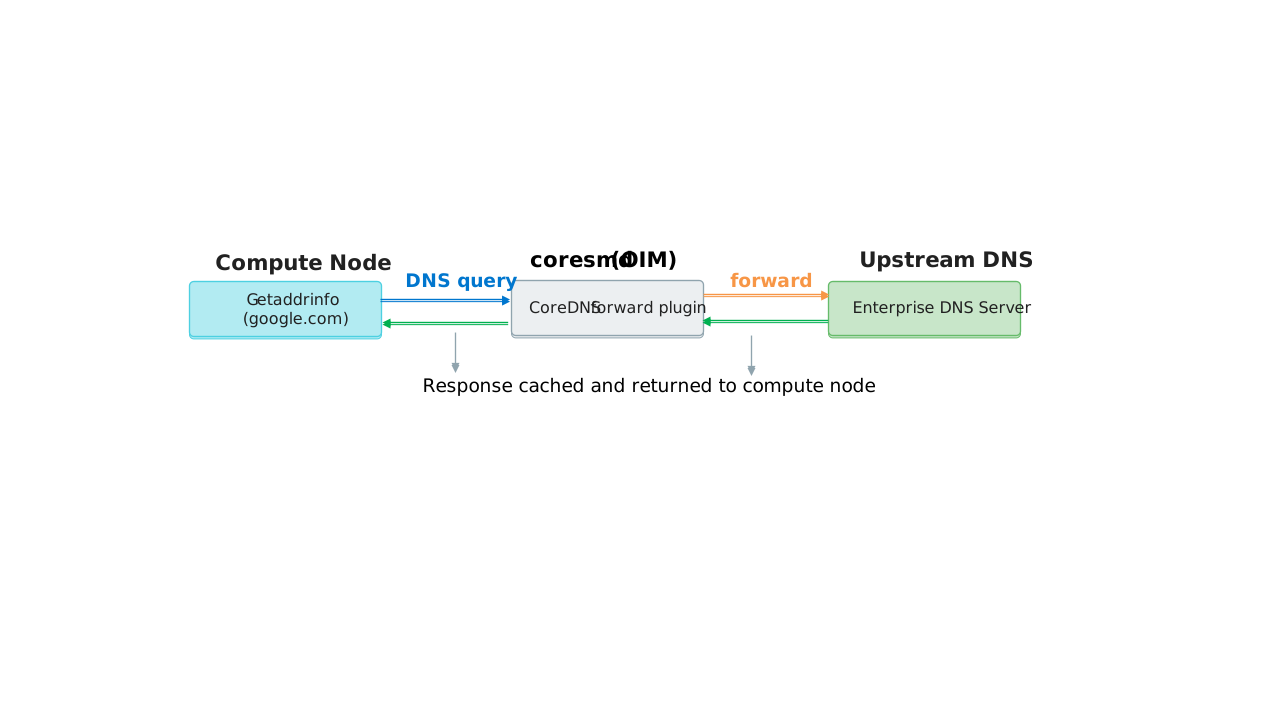
Use Cases
- Cluster nodes need to resolve external services (e.g., package repositories, authentication servers)
- Cluster nodes need to resolve internal enterprise services outside the cluster domain
- Kubernetes pods need to resolve external APIs
Configuration Example
Networks:
- admin_network:
    dns:
      - 8.8.8.8
      - 8.8.4.4
Note
The admin_network.dns configuration is used by both coresmd and Kubernetes CoreDNS for external resolution.
Interaction with Kubernetes CoreDNS
K8s CoreDNS ConfigMap Patching
When DNS is Enabled
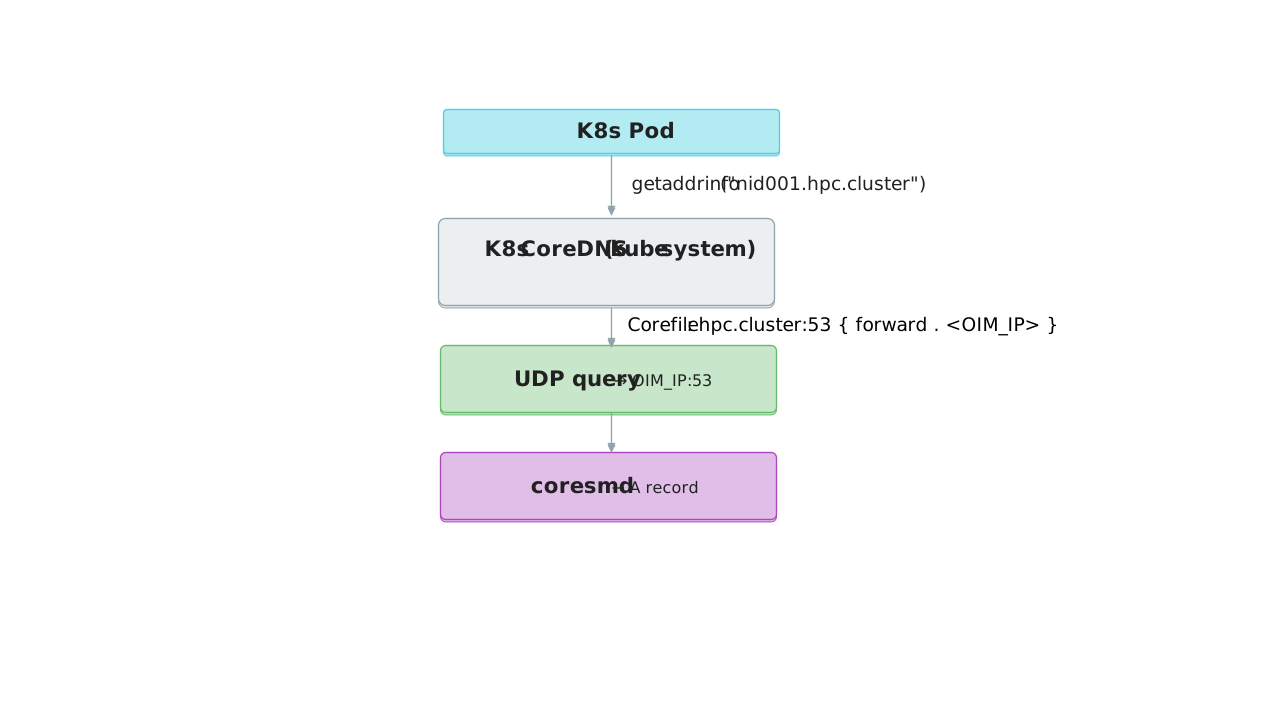
- The first Kubernetes control plane node's cloud-init script patches the K8s CoreDNS ConfigMap
- Adds a forward zone block:
<domain_name>:53 { errors; cache 30; forward . <admin_nic_ip> } - The patch is idempotent: if the zone already exists, it is not added again
- After patching, the K8s CoreDNS deployment is restarted via
kubectl rollout restart
Pod Resolution Flow
Verification
After patching, K8s pods can resolve compute node hostnames:
kubectl exec -it <pod> -- getent hosts nid001.hpc.cluster
Use Case
- Enables MPI-over-Kubernetes workloads to resolve Slurm/compute hostnames from within pods
- Allows host-network pods and jobs to resolve compute node hostnames
Operational Expectations
Resolution Latency
Cached Queries
- DNS queries are served from coresmd's in-memory cache (30s TTL)
- Cached lookup latency: < 1 millisecond
- Sub-millisecond response times for cached lookups
Cache Refresh
- coresmd queries SMD every 30 seconds to refresh its inventory cache
- New nodes added to SMD are resolvable within 30 seconds of registration
- Removed nodes stop resolving after the next cache refresh (up to 30 seconds)
Uncached Queries
- First lookup for a new node requires coresmd to query SMD
- Latency depends on SMD API response time (typically < 100ms)
Node Lifecycle Behavior
Node Add
- Register node in SMD via discovery playbook
- coresmd picks it up within 30s (next cache refresh)
- slurmctld can resolve it via DNS
- Node transitions to IDLE state
- No playbook re-run needed for DNS resolution
Node Remove
- Remove node from SMD
- coresmd drops the record within 30s (next cache refresh)
- slurmctld marks node as DOWN
- No
/etc/hostscleanup needed
Node Reprovision
- Changing
dns_enabledrequires node reprovisioning (reboot into cloud-init) - Cloud-init writes the appropriate resolver configuration (
/etc/resolv.confor/etc/hosts) - This is a deployment-time decision, not expected to change frequently
Common Failure Scenarios
coresmd Unreachable
Scenario — OIM node is down or coresmd container is stopped
Behavior
- DNS queries from compute nodes time out after 1 second (
options timeout:1) - Queries retry once (
options attempts:2), then fail - All hostname resolution fails until coresmd is restored
Impact
- Slurm jobs cannot start
- Running MPI jobs that need to resolve new peers will fail
- Already-connected TCP sessions continue until a new resolution is needed
Mitigation
- Restart coresmd container:
podman restart coresmd-coredns - Monitor coresmd health via Prometheus metrics on port 9153
- Future HA enhancement will provide VIP failover
SMD Unreachable from coresmd
Scenario — SMD API is down but coresmd is running
Behavior
- coresmd continues serving records from its last cached SMD query (up to 30s stale)
- New nodes added during the outage are not resolvable until SMD recovers and coresmd refreshes its cache
Impact
- Existing nodes continue to resolve (stale data)
- New nodes cannot be resolved until SMD recovery
Mitigation
- Restart SMD service
- Monitor SMD health and connectivity
Node Not in SMD
Scenario — A node is provisioned but not registered in SMD
Behavior
- coresmd has no record for the node
- DNS queries for its hostname return NXDOMAIN
- Slurm marks the node as DOWN
Mitigation
- Ensure discovery playbook has been run to register the node in SMD
- Verify SMD inventory:
curl -k https://<oim_ip>:8443/v1/nodes
Domain Misconfiguration
Scenario — domain_name in OIM metadata does not match the zone configured in coresmd Corefile
Behavior
- Compute nodes search for
<hostname>.<wrong_domain>which coresmd does not serve - Resolution fails with NXDOMAIN
Mitigation
domain_nameis set once duringprepare_oim.ymland used consistently across all templates- User does not configure the domain separately
- Verify OIM metadata if resolution fails
Upstream DNS Failure
Scenario — All upstream DNS servers specified in admin_network.dns are unreachable
Behavior
- Non-cluster DNS queries (e.g.,
google.com) fail - Cluster internal resolution (e.g.,
nid001.hpc.cluster) continues to work
Impact
- Cluster nodes cannot resolve external services
- Package repositories, authentication servers, and external APIs may be unreachable
Mitigation
- Ensure at least two reliable upstream DNS servers are configured
- Monitor upstream DNS server availability
- Use local caching DNS servers if external connectivity is unreliable
Firewall Blocking DNS Port
Scenario — Firewall on the OIM node blocks UDP/TCP port 53
Behavior
- Compute nodes cannot reach CoreDNS
- DNS queries time out; all hostname resolution fails
- SSH between nodes fails if hostnames are used
Mitigation
- Port 53 is opened unconditionally during OpenCHAMI deployment via the
firewall.ymltask - If port 53 is not open, manually open it:
firewall-cmd --permanent --add-port=53/udp --add-port=53/tcp && firewall-cmd --reload
- Verify port is open:
firewall-cmd --list-ports
For a complete list of Cluster DNS limitations and constraints, see Known Limitations.
Use Cases
Large-Scale Clusters (100+ Nodes)
- Eliminates O(N x M) SSH operations for
/etc/hostsmanagement - Reduces provisioning time significantly
- Provides consistent hostname resolution across the cluster
Dynamic Node Environments
- New nodes are automatically resolvable within 30 seconds
- No playbook re-run needed for DNS updates
- Ideal for environments with frequent node additions/removals
MPI-Over-Kubernetes Workloads
- K8s pods can resolve compute node hostnames via CoreDNS forwarding
- Enables hybrid Slurm/Kubernetes deployments
- Supports containerized MPI workloads
Sites with Strict Network Policies
- Eliminates SSH access requirement for
/etc/hostsmanagement - Reduces attack surface by removing SSH-based configuration pushes
- DNS queries use UDP/TCP port 53 only
Verifying Hostname Resolution
Query DNS Only (Bypasses /etc/hosts)
To verify CoreDNS resolution directly without checking /etc/hosts:
dig <hostname>.<domain> @<admin_nic_ip>
Replace <hostname> with a cluster node hostname (e.g., nid001), <domain> with your cluster domain, and <admin_nic_ip> with the OIM admin IP.
Expected output includes an ANSWER SECTION with the node's IP address:
;; ANSWER SECTION:
nid001.hpc.cluster.     60      IN      A       172.17.0.248
Query Using Full System Resolution Order
To verify resolution using the system's configured order (/etc/hosts first, then DNS):
getent ahosts <hostname>.<domain>
This follows the system's configured resolution order. If the name is in /etc/hosts, it returns that entry. Otherwise, it queries DNS.
Verify All Nodes Resolve
To verify all NID hostnames resolve correctly via CoreDNS:
for i in $(seq -w 1 <num_nodes>); do \
  echo -n "nid0${i}: "; \
  dig +short nid0${i}.<domain> @<admin_nic_ip>; \
done
resolv.conf Configuration
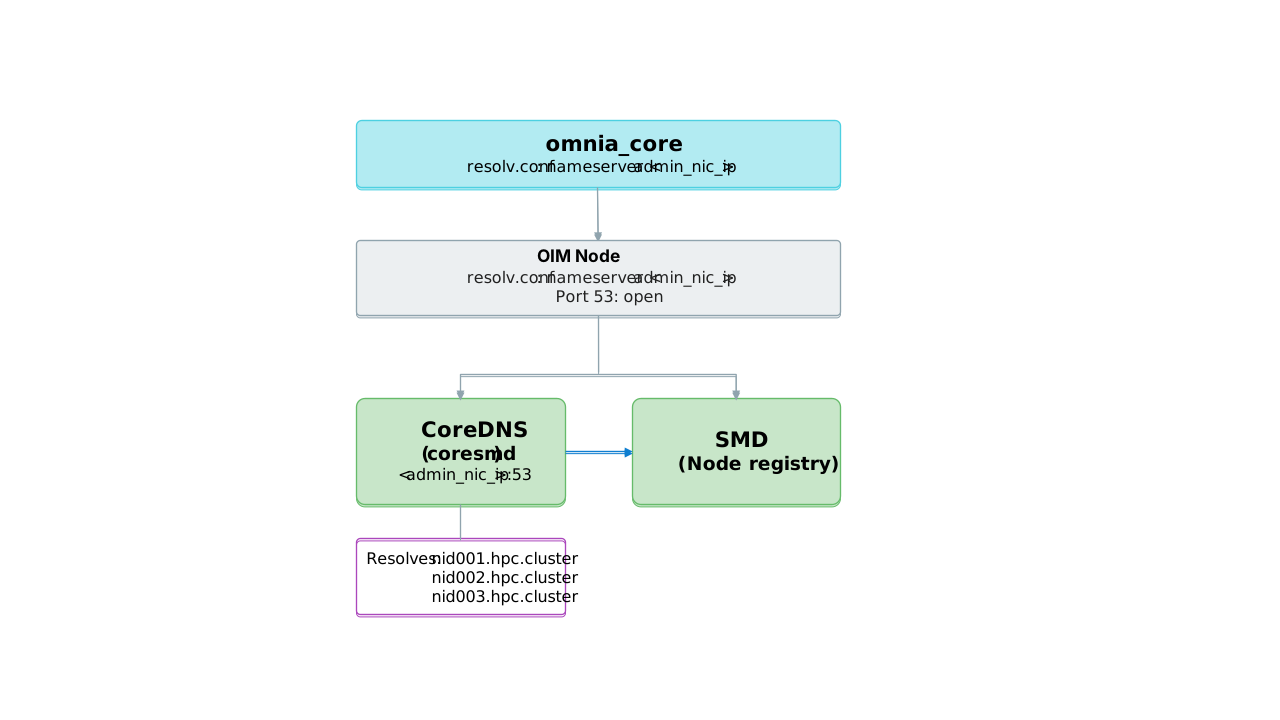
When dns_enabled: true, Omnia configures /etc/resolv.conf on both the OIM host and omnia_core to use CoreDNS as the primary nameserver:
search <domain_name> <existing-search-domains>
nameserver <cluster_boot_ip>
nameserver <existing-nameservers>
search <domain_name>— Allows short hostnames (e.g.,nid001) to resolve as FQDNs (nid001.hpc.cluster)nameserver <cluster_boot_ip>— CoreDNS listening on the cluster boot IP- Existing nameservers are preserved as fallback for external DNS queries
Note
The resolv.conf is protected with the immutable attribute (chattr +i) on the OIM host to prevent NetworkManager from overwriting it.
Architecture Summary
Related Pages
- Configure Cluster DNS -- Enable, verify, and troubleshoot Cluster DNS.
- Provision Config -- Reference for the
dns_enabledparameter. - Known Limitations -- Cluster DNS constraints.