Skip to content

Product and Subsystem Security

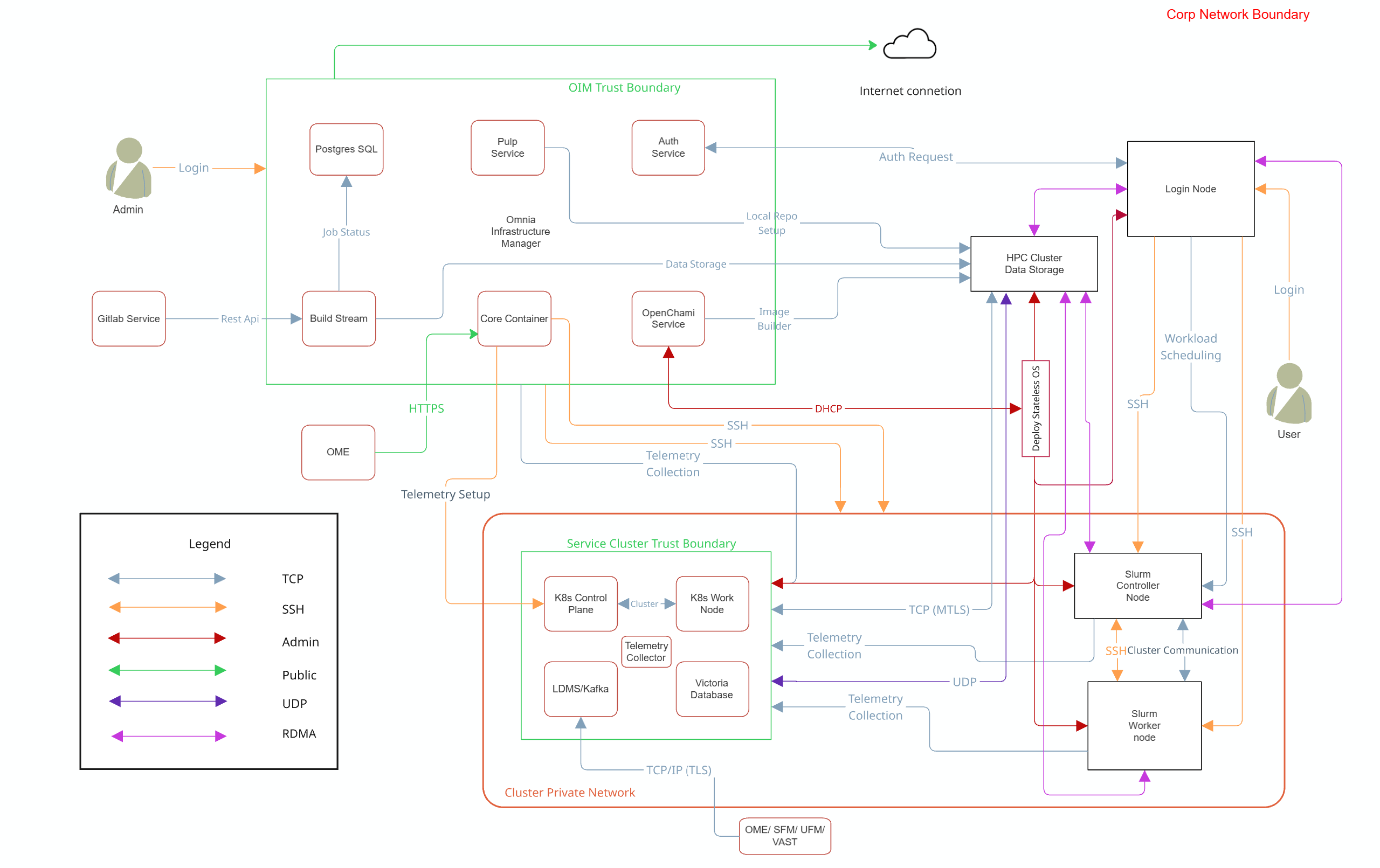
Security Controls Map

Security Controls Map

Note

Omnia supports NFS configured on the following external storage solutions for HPC cluster data storage:

  • Dell PowerVault (iSCSI)
  • Dell PowerScale (CSI)
  • VAST (NFS)

Each storage system may require specific authentication credentials and configurations. Refer to the respective storage integration documentation for detailed setup instructions.

Omnia performs bare metal configuration to enable AI/HPC workloads. It uses Ansible playbooks to perform installations and configurations. iDRAC is supported for provisioning bare metal servers. Omnia enables provisioning of clusters via PXE using a mapping file (Mandatory) to dictate IP address/MAC mapping.

Omnia can be installed via CLI only. Slurm and Kubernetes are deployed and configured on the cluster. When a catalog group name contains the lowercase text openldap, Orchestrator deploys OpenLDAP for supported Slurm and login functional groups.

To perform these configurations and installations, a secure SSH channel is established between the management node and the following entities:

  • slurm_control_node
  • slurm_node
  • login_node
  • service_kube_control_plane
  • service_kube_node

Authentication

Omnia adheres to a subset of the specifications of NIST 800-53 and NIST 800-171 guidelines on the OIM and login node.

The omnia.sh and Ansible workflows run with operating-system privileges on the OIM and use SSH credentials or keys when they administer other hosts. They do not provide an interactive Omnia user-login service. Deployed third-party tools continue to enforce their own accounts and authorization models.

BuildStreaM is an exception to the statement above: when enabled, its REST API implements application authentication and authorization.

Stage BuildStreaM control
Client registration POST /api/v1/auth/register verifies the configured registration username and Argon2id password hash through HTTP Basic authentication. Only one active registered client is supported. The generated client secret is returned once.
Credential storage The registered client secret is stored as an Argon2id hash in the BuildStreaM Ansible Vault-encrypted credential file. The initial registration password hash is stored in the same file.
Token issuance POST /api/v1/auth/token verifies the client ID and secret and issues an RS256-signed JWT. The default access-token lifetime is 60 minutes. Requested scopes must be a subset of the client's allowed scopes.
Protected API operations Operational routes validate the bearer JWT. Routes that declare a scope dependency also return an authorization error when the required scope is absent.
Public endpoints The API root, health endpoint, OpenAPI document, and interactive API documentation do not require a bearer token. Protect port 8010 with network controls so that only intended clients can reach the service.

See Network Security for the conditional BuildStreaM communication paths and Authentication to External Systems for credentials and trust boundaries outside the BuildStreaM API.

AI-Assisted Catalog Authoring

Use only a coding agent approved by your site. Apply the site's access, data-handling, retention, and audit requirements to the catalog content that you provide.

Do not include credentials, keytabs, access tokens, private keys, or other site secrets in prompts, skill inputs, catalogs, or generated output.

Review generated content and explicitly approve a proposed catalog edit before it is applied. Review and validate catalog changes on a working branch, and use your normal Git and Merge Request controls before merging them.

See AI-Assisted Catalog Authoring to select and invoke a catalog-authoring skill.

Cluster Authentication Tool

For centralized authentication, Orchestrator can deploy OpenLDAP, an open source directory service for Linux networked environments. Selection is catalog-driven, and the current provisioning templates configure OpenLDAP clients on supported Slurm control, compute, and login functional groups. The Kubernetes provisioning path does not configure an OpenLDAP client. Site administrators remain responsible for user and group management.

Note

Omnia does not configure OpenLDAP users or groups.

Authentication Types and Setup

Key-Based authentication

Use of SSH authorized_keys

A password-less channel is created between the management station and compute nodes using SSH authorized keys. This is explained in the Security Controls Map.

Login Security Settings

Users provide credentials to the domain that owns the corresponding service. Each credential-owning domain stores its credentials in a separate Ansible Vault-encrypted file under its project input directory. By default, these files and their corresponding Vault keys are stored in:

<OMNIA_DATA_PATH>/<domain>/input/<project>/

Domain or workflow Credential file Vault key Stored credentials
Orchestrator orchestrator_credentials.yml .orchestrator_credentials_key Provisioning: provision_password, bmc_username, bmc_password; Slurm: slurm_db_password; OpenLDAP: openldap_db_username, openldap_db_password; PowerScale CSI: csi_username, csi_password
Repository Manager repo_manager_config_credentials.yml .repo_manager_config_credentials_key Pulp: pulp_username, pulp_password; Docker Hub: docker_username, docker_password; credentials for configured private registries
Image Build Manager image_build_credentials.yml .image_build_credentials_key S3 or MinIO: s3_access_id, s3_secret_key; ARM build host: aarch64_ssh_password
BuildStreaM build_stream_credentials.yml .build_stream_credentials_key PostgreSQL: postgres_user, postgres_password; GitLab: gitlab_root_password, gitlab_ssh_password; BuildStreaM authentication: build_stream_auth_username, build_stream_auth_password. The corresponding password hash is generated internally.
Discovery discovery_credentials.yml .discovery_credentials_key OME: ome_username, ome_password
Telemetry telemetry_credentials.yml .telemetry_credentials_key iDRAC: bmc_username, bmc_password, mysqldb_user, mysqldb_password, mysqldb_root_password; PowerScale: csi_username, csi_password; LDMS: ldms_sampler_password; UFM: ufm_username, ufm_password; VAST: vast_username, vast_password
Utils unattended OS installation install_os_credentials.yml .install_os_credentials_key iDRAC/BMC: bmc_username, bmc_password; installed OS root account: os_root_password

Credential collection depends on the enabled service or workflow:

  • Orchestrator requests slurm_db_password when Slurm support is enabled and PowerScale credentials when PowerScale CSI is enabled.
  • Image Build Manager requests the ARM build-host password only when an ARM build host is configured.
  • Telemetry requests the iDRAC and MySQL credentials when iDRAC metrics are enabled. It requests the LDMS, PowerScale, UFM, and VAST credentials only when the corresponding telemetry source is enabled.
  • Utils requests its credentials as part of the unattended OS installation workflow.

Credentials with the same variable name in different domain files are separate. For example, the Orchestrator, Telemetry, and Utils domains maintain their own bmc_username and bmc_password values.