Network Topologies
Omnia supports multiple network topology configurations to accommodate different deployment scenarios, hardware configurations, and operational requirements. The network topology defines how cluster nodes are interconnected through various network segments including Admin (PXE), BMC (iDRAC), Public, and InfiniBand networks.
Choosing the right topology
Select a network topology based on your infrastructure requirements:
-
Dedicated Setup -- Use when you have dedicated network infrastructure with separate physical connections for BMC (iDRAC) management. This provides the highest level of isolation and security for out-of-band management.
-
Shared LOM Setup -- Ideal for deployments where network port availability is limited. The Administration and BMC networks share the same ethernet segment, reducing cabling requirements while maintaining functionality.
-
Hybrid Setup -- Suitable for environments where the Omnia Infrastructure Manager (OIM) and special nodes (head, login) require public network access, while compute nodes use a shared LOM network for management and BMC.
-
Multi-Rack Multi-Subnet Setup -- Designed for large-scale HPC and AI/ML deployments spanning multiple racks. Each rack has its own /24 subnet for the Admin network, improving scalability, failure isolation, and operational efficiency.
Note
All topologies support classless IP addressing, allowing different subnets for Admin, BMC, Public, and Additional networks. For all topologies, OME-based BMC Discovery is the recommended discovery mechanism.
Dedicated setup
Note
The following diagram is for representational purposes only.
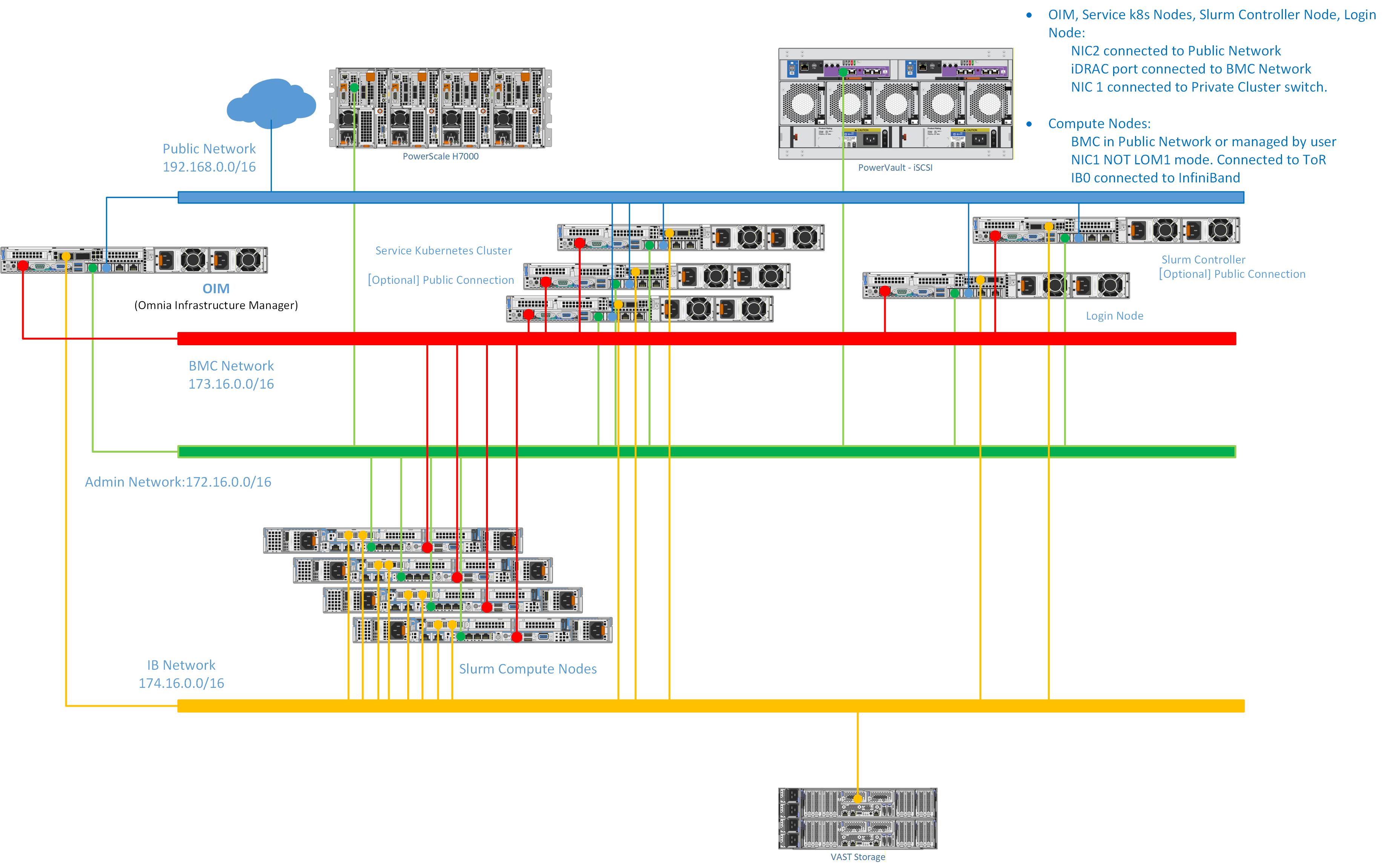
In a Dedicated Setup, all the cluster nodes (Head, Compute, and Login [optional]) have dedicated iDRAC connections.
-
Public Network (Blue line) -- This indicates the external public network that is connected to the internet. NIC2 of the OIM is connected to the public network.
-
BMC Network (Red line) -- This indicates the private BMC (iDRAC) network used by the OIM to control the cluster nodes using out-of-band management.
-
Admin Network (Green line) -- This indicates the admin network used by Omnia to provision the cluster nodes. NIC1 of all the nodes are connected to the private switch.
-
InfiniBand Network (Yellow line) -- This indicates the high-speed InfiniBand network used for high throughput inter-node communication in the cluster.
Note
Omnia supports classless IP addressing, which allows the Admin network, BMC network, Public network, and the Additional network to be assigned different subnets.
Recommended discovery mechanism
- Discovery Mechanisms (OME-based BMC Discovery is recommended)
Shared LOM setup
Note
The following diagram is for representational purposes only.
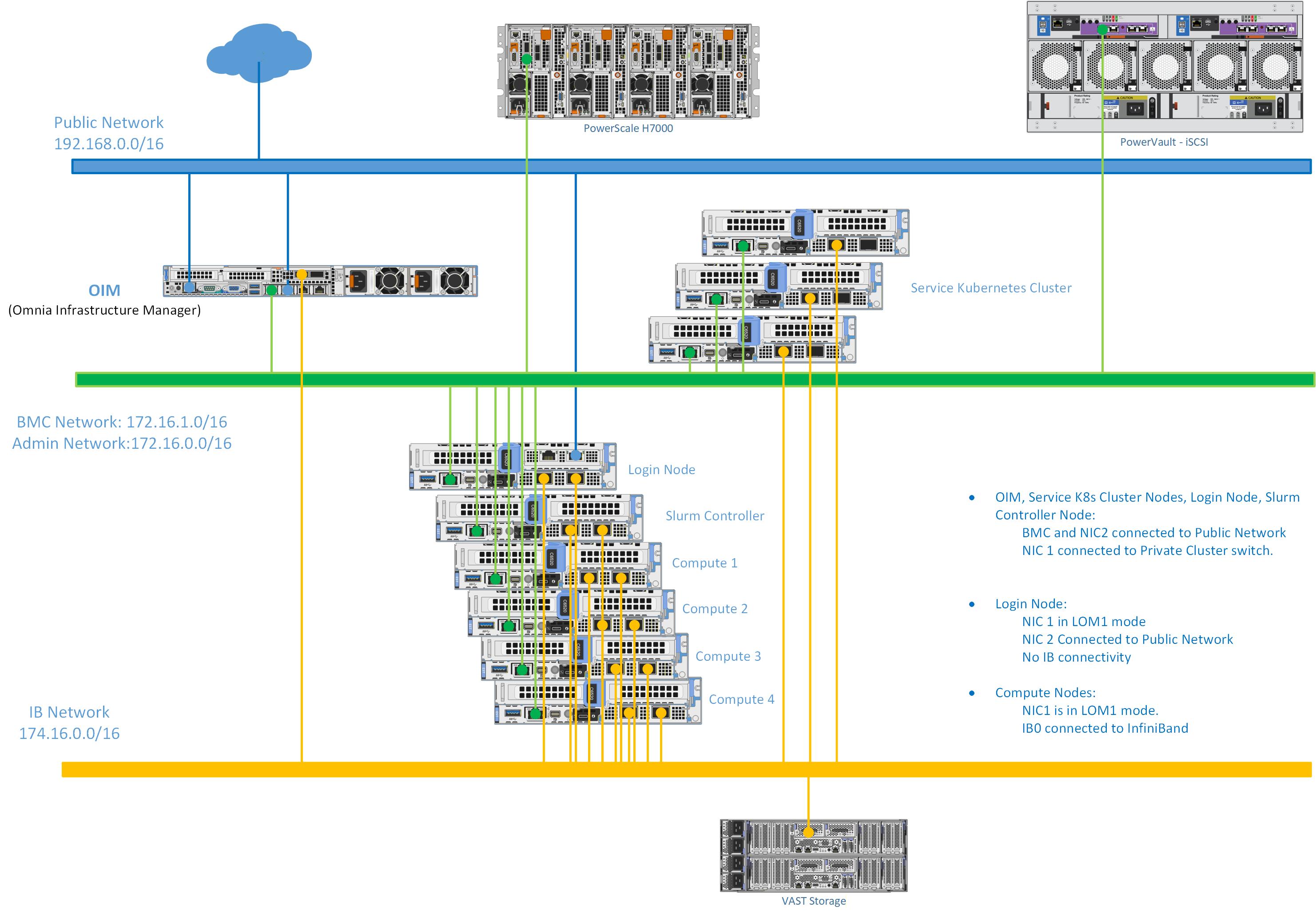
In a Shared LOM setup, the Administration and BMC logical networks share the same ethernet segment and physical connection.
-
Public Network (Blue line) -- This indicates the external public network which is connected to the internet. NIC2 of the OIM is connected to the public network.
-
Admin Network and BMC network (Green line) -- This indicates the admin network and the BMC network utilized by Omnia to provision the cluster nodes and to control the cluster nodes using out-of-band management. NIC1 of all the nodes are connected to the private switch.
-
InfiniBand Network (Yellow line) -- This indicates the high-speed InfiniBand network used for high throughput inter-node communication in the cluster.
Note
Omnia supports classless IP addressing, which allows the Admin network, BMC network, Public network, and the Additional network to be assigned different subnets.
Recommended discovery mechanism
- Discovery Mechanisms (OME-based BMC Discovery is recommended)
Hybrid setup
Note
The following diagram is for representational purposes only.
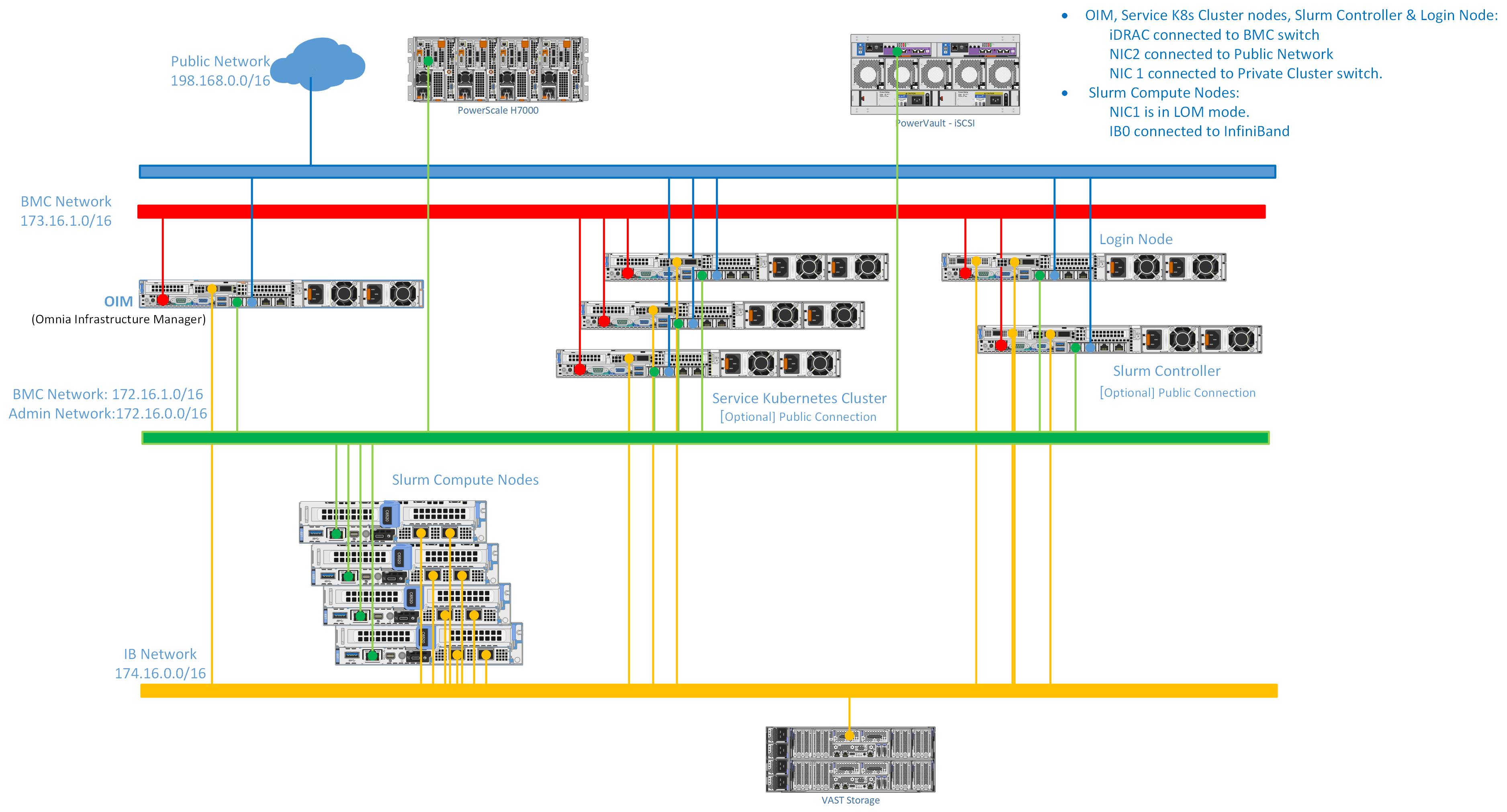
In a Hybrid Setup, the OIM and special nodes such as the head and login node are connected to the public network, while the iDRAC and the compute nodes use a shared LOM network.
-
Public Network (Blue line) -- This indicates the external public network which is connected to the internet. NIC2 of the OIM is connected to the public network.
-
Admin Network and BMC network (Green line) -- This indicates the admin network and the BMC network utilized by Omnia to provision the cluster nodes and to control the cluster nodes using out-of-band management. NIC1 of all the nodes are connected to the private switch.
-
InfiniBand Network (Yellow line) -- This indicates the high-speed InfiniBand network used for high throughput inter-node communication in the cluster.
Note
Omnia supports classless IP addressing, which allows the Admin network, BMC network, Public network, and the Additional network to be assigned different subnets.
Recommended discovery mechanism
- Discovery Mechanisms (OME-based BMC Discovery is recommended)
Multi-rack multi-subnet setup
Note
The following diagram is for representational purposes only.
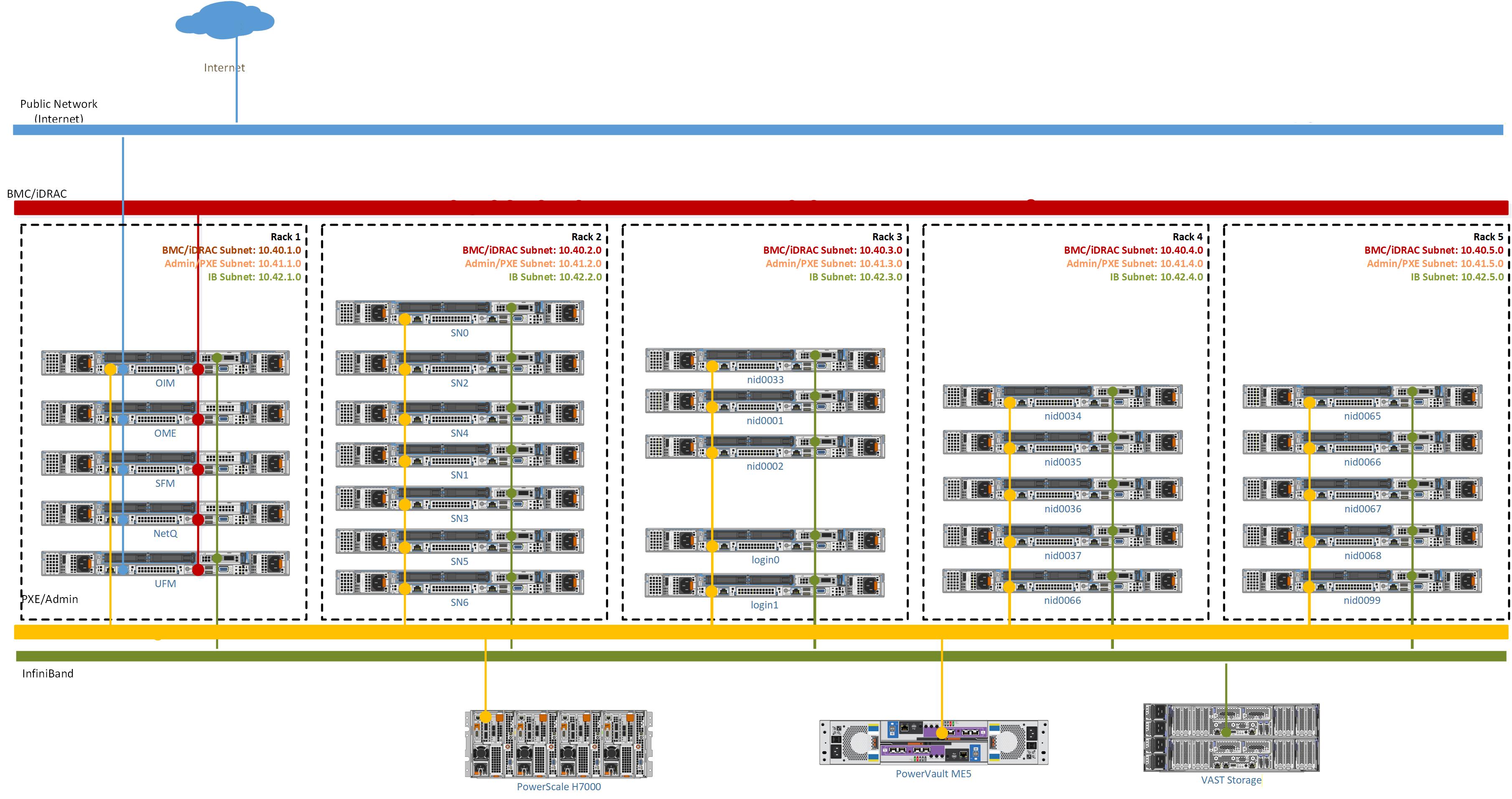
In a Multi-Rack Multi-Subnet Setup, each rack has its own /24 subnet for the Admin (PXE) network. This architecture allows large-scale HPC and AI/ML deployments to have per-rack management subnets instead of a single shared subnet, improving scalability, failure isolation, and operational efficiency.
-
Public Network (Blue line) -- This indicates the external public network that is connected to the internet. NIC2 of the OIM is connected to the public network.
-
BMC Network (Red line) -- This indicates the private BMC (iDRAC) network used by the OIM to control the cluster nodes using out-of-band management.
-
Admin Network (Yellow line) -- This indicates the admin network used by Omnia to provision the cluster nodes. NIC1 of all the nodes are connected to the private switch. In this topology, each rack has its own /24 subnet for the Admin network, and DHCP relay agents on Top-of-Rack (ToR) switches forward DHCP requests to the CoreDHCP server.
-
InfiniBand Network (Green line) -- This indicates the high-speed InfiniBand network used for high throughput inter-node communication in the cluster.
Note
Omnia supports classless IP addressing, which allows the Admin network, BMC network, Public network, and the Additional network to be assigned different subnets.
Recommended discovery mechanism
- Discovery Mechanisms (OME-based BMC Discovery is recommended)
Info
- Architecture -- How the OIM connects to each network segment.
- PXE Mapping File -- How nodes are assigned IP addresses and roles across network segments.