Provision
⦾ Why am I unable to do ssh to the booted nodes via omnia_core container?
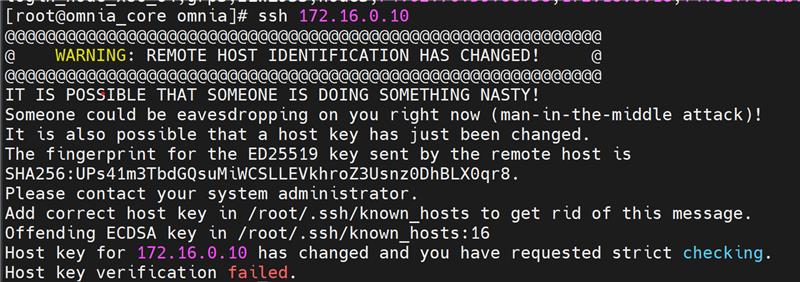
Potential Causes: This issue is due to SSH host key mismatch.
Resolution: User needs to manually run the below command inside omnia_core container:
ssh-keygen -R <node_admin_ip>
This removes all SSH entries for that IP from your local ~/.ssh/known_hosts file.
⦾ Why are the hostname and root password not configured on the nodes after boot?
Potential Causes: Cloud-init is not properly loaded on the target servers during provisioning. For more information, see Inconsistent cloud-init behavior with multiple node group configurations.
Resolution: Wait for 5 minutes and retry provisioning the node. If the issue persists, redeploy the cluster after running the oim_cleanup.yml playbook.
⦾ Why does the cloud-init server fail when running provision.yml?
Potential Causes: The OpenCHAMI certificate has expired or any openchami.target services are not running.
Resolution:
Check if OpenCHAMI target dependencies are satisfied using the following command:
systemctl list-dependencies openchami.target
If certificate expiry issues occur, restart acme-deploy service using the following command:
systemctl restart acme-deploy
If any other service under OpenCHAMI target failed, restart it using the following command:
systemctl restart <service_name>
Wait for OpenCHAMI target and all its dependencies to be active using the following command:
systemctl is-active openchami.target
If you have any feedback about Omnia documentation, please reach out at omnia.readme@dell.com.