Execute the Local Repo Playbook
The local repository playbook (local_repo.yml) downloads and saves the software packages/images to the Pulp container, which all cluster nodes can access.
Configurations made by the playbook
With
repo_configset toalwaysin/opt/omnia/input/project_default/software_config.json, all images and artifacts will be downloaded to the Pulp container present on the NFS share.If
repo_configis set toalways, the OIM serves as the default Pulp registry.
Playbook Execution
To create local repositories on the Pulp container, execute the local_repo.yml playbook using the following command:
ssh omnia_core
cd /omnia/local_repo
ansible-playbook local_repo.yml
Metadata Report
After a successful execution of the local_repo.yml playbook, a metadata file called localrepo_metadata.yml is created under the /opt/omnia/offline_repo/.data/ directory.
This file captures the repo_config (always, partial) details provided during the playbook execution.
If the local_repo.yml playbook is re-run, it compares the current repository policy with the previously captured metadata. Based on this, there can be two scenarios:
If a change in policy is detected, you will be prompted to confirm whether to proceed with the updated configuration or not.
If you agree, the playbook continues with the updated policy and after successful execution, it updates the metadata file with the new repository policy.
If you decline, the playbook execution is aborted and the metadata file remains unchanged.
If there is no change in policy, the playbook execution proceeds without prompting. The metadata file remains unchanged.
Check Status of the Packages
After local_repo.yml has been executed, a status report is displayed containing the status for each downloaded package along with the complete playbook execution time. Here’s an example of what that might look like:
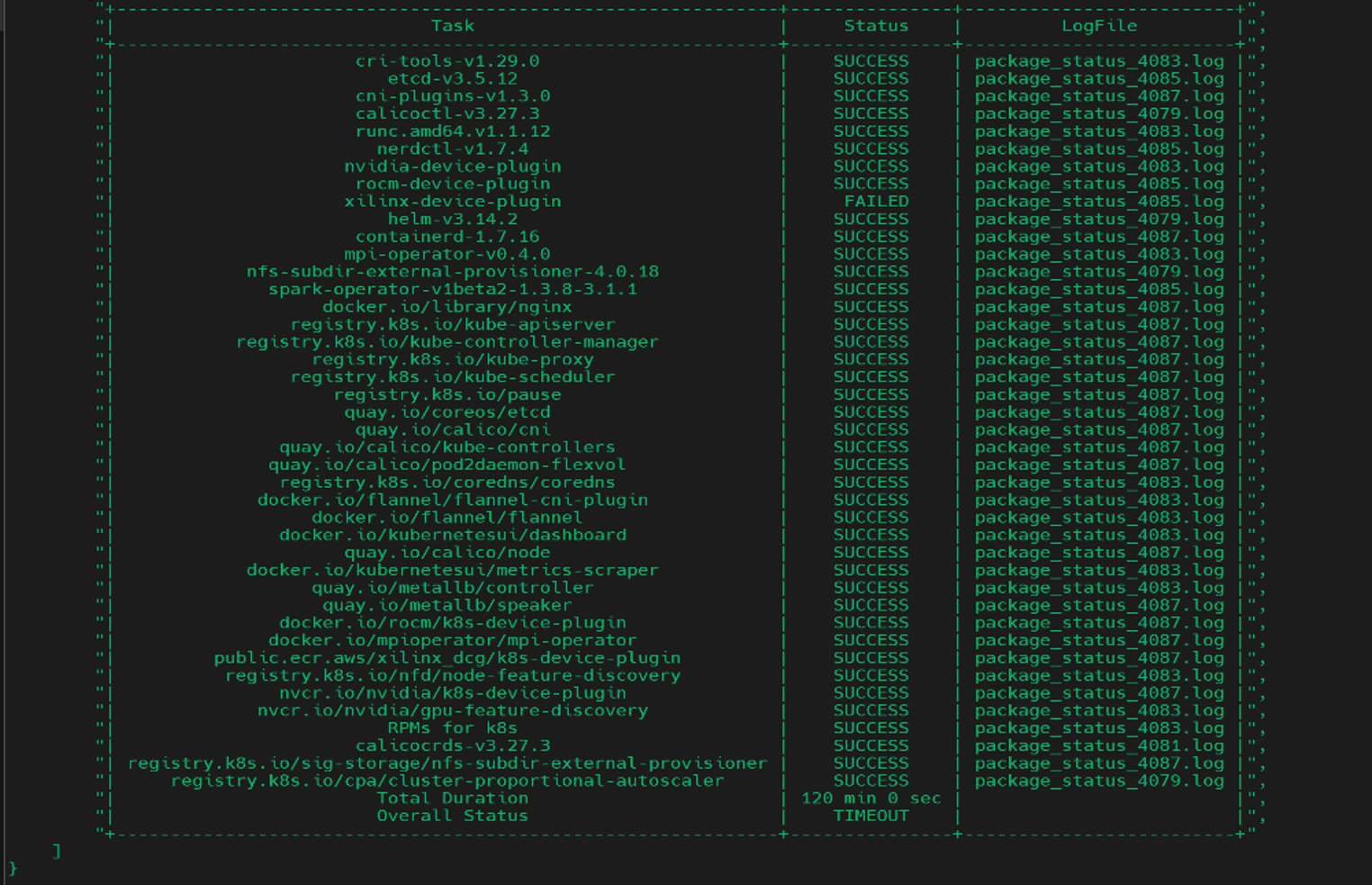
SUCCESS: The package has been successfully downloaded to the Pulp container.
FAILED: The package couldn’t be downloaded successfully.
Note
The
local_repo.ymlplaybook execution fails if any software package has aFAILEDstatus. In such a scenario, the user needs to re-run thelocal_repo.ymlplaybook.If any software package fails to download during the execution of this playbook, other scripts/playbooks that rely on the package may also fail.
To download additional software packages after the playbook has been executed, simply update the
/opt/omnia/input/project_default/software_config.jsonwith the new software information and re-run thelocal_repo.ymlplaybook.
Log Files
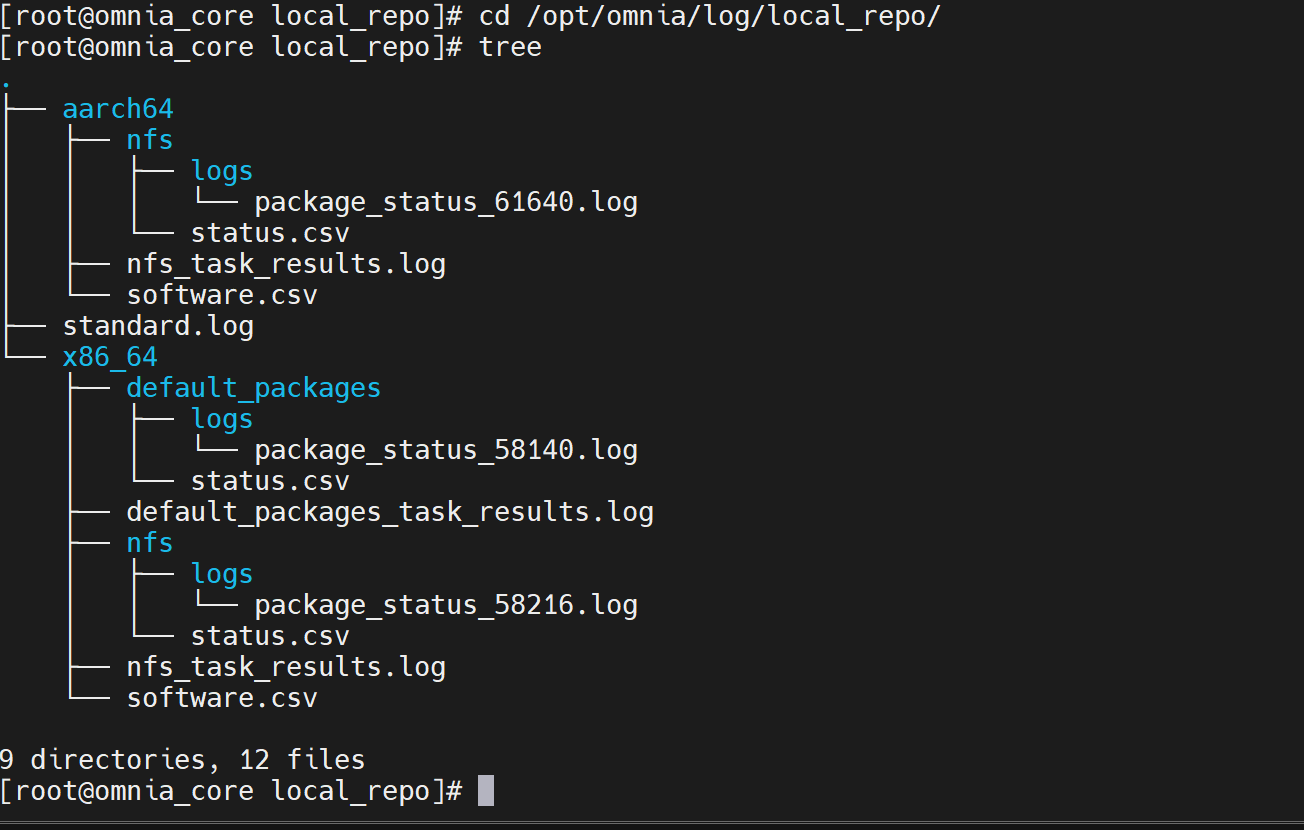
The local_repo.yml playbook generates and provides two types of log files as part of its execution:
standard.log: This log file is present in the/opt/omnia/log/local_repodirectory, and contains the overall status of thelocal_repo.ymlplaybook execution.Package based logs: Each package download initiated by the
local_repo.ymlplaybook comes with its own log file. These log files can be accessed from/opt/omnia/log/local_repo.
Note
To view the log files in .csv format, navigate to /opt/omnia/log/local_repo/<arch_type>/<sw_name>/status.csv.
Here’s an example of how the log files are organized in the /opt/omnia/log/local_repo directory:
Updating Local Repositories after Modifying JSON Files
After the execution of the local_repo.yml playbook is complete, any modifications made to a <software_name>.json file (for example, service_k8s.json, slurm_custom.json, additional_software.json) will not be reflected in the local repositories automatically.
To apply the changes, you must re-run the local_repo.yml playbook.
Command Format
ansible-playbook local_repo.yml
If you have any feedback about Omnia documentation, please reach out at omnia.readme@dell.com.