Step 5: Provide Inputs to the Files in the project_default Directory
Omnia is now deployed using a project-based approach. Once the omnia_core container is deployed, all the input files needed for the cluster will be available in the /opt/omnia/input/project_default directory on the NFS share.
Before moving on to the next step, which is running the prepare_oim.yml playbook, you must provide inputs for all the files in this directory.
Here’s an example of the input files present in the project_default directory:
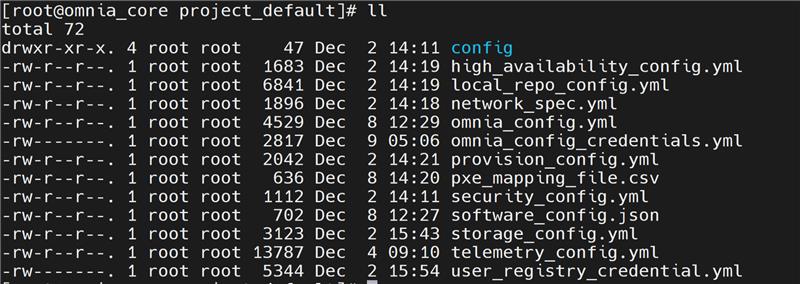
Input Templates for Deployment
You can use the provided input templates to simplify deployment. Choose the template that matches your cluster architecture and telemetry requirements:
x86_64 Slurm cluster with telemetry: Use the templates available at:
omnia/examples/input_template/bare_metal_slurm/x86_64/with_service_k8sx86_64 Slurm controller node with ARM-based Slurm nodes and telemetry: Use the templates available at:
omnia/examples/input_template/bare_metal_slurm/aarch64/with_service_k8sx86_64 Slurm cluster without telemetry: Use the templates available at:
omnia/examples/input_template/bare_metal_slurm/x86_64/without_service_k8sx86_64 Slurm controller node with ARM-based Slurm nodes without telemetry: Use the templates available at:
omnia/examples/input_template/bare_metal_slurm/aarch64/without_service_k8s
Default Values Assumed in these Templates (change if needed):
Virtual address for Kubernetes cluster:
172.16.0.1OIM PXE NIC IP address:
172.16.0.254Mapping file path (provided in the same folder):
./pxe_mapping_file.csvExternal NFS share for all Omnia workflows: IP address:
172.16.0.253, Path:/mnt/share/omniaNFS share for HA on service Kubernetes cluster: IP addresses:
172.16.0.252, Path:/mnt/share/omnia_k8s
Additional values you must provide:
- Local repository configuration:
rhel_os_url_x86_64– BaseOS, AppStream, and CRB repository details for x86_64 node provisioningrhel_os_url_aarch64– BaseOS, AppStream, and CRB repository details for aarch64 node provisioning
Note
If the RHEL subscription on the OIM is not enabled, the rhel_os_url_x86_64 and rhel_os_url_aarch64 parameters are mandatory.
- Telemetry configuration (if enabled):
csi_powerscale_driver_secret_file_path– Powerscale driver secret filecsi_powerscale_driver_values_file_path– Powerscale driver values file
Input Validator
Once all the input files are filled, the input validator can be used to verify if the provided inputs are correct or not. This helps reduce execution delays at runtime caused by wrong inputs. Use the following command to execute the input validator:
cd input_validation
ansible-playbook validate_config.yml
If you have any feedback about Omnia documentation, please reach out at omnia.readme@dell.com.