Product and Subsystem Security
Security controls map
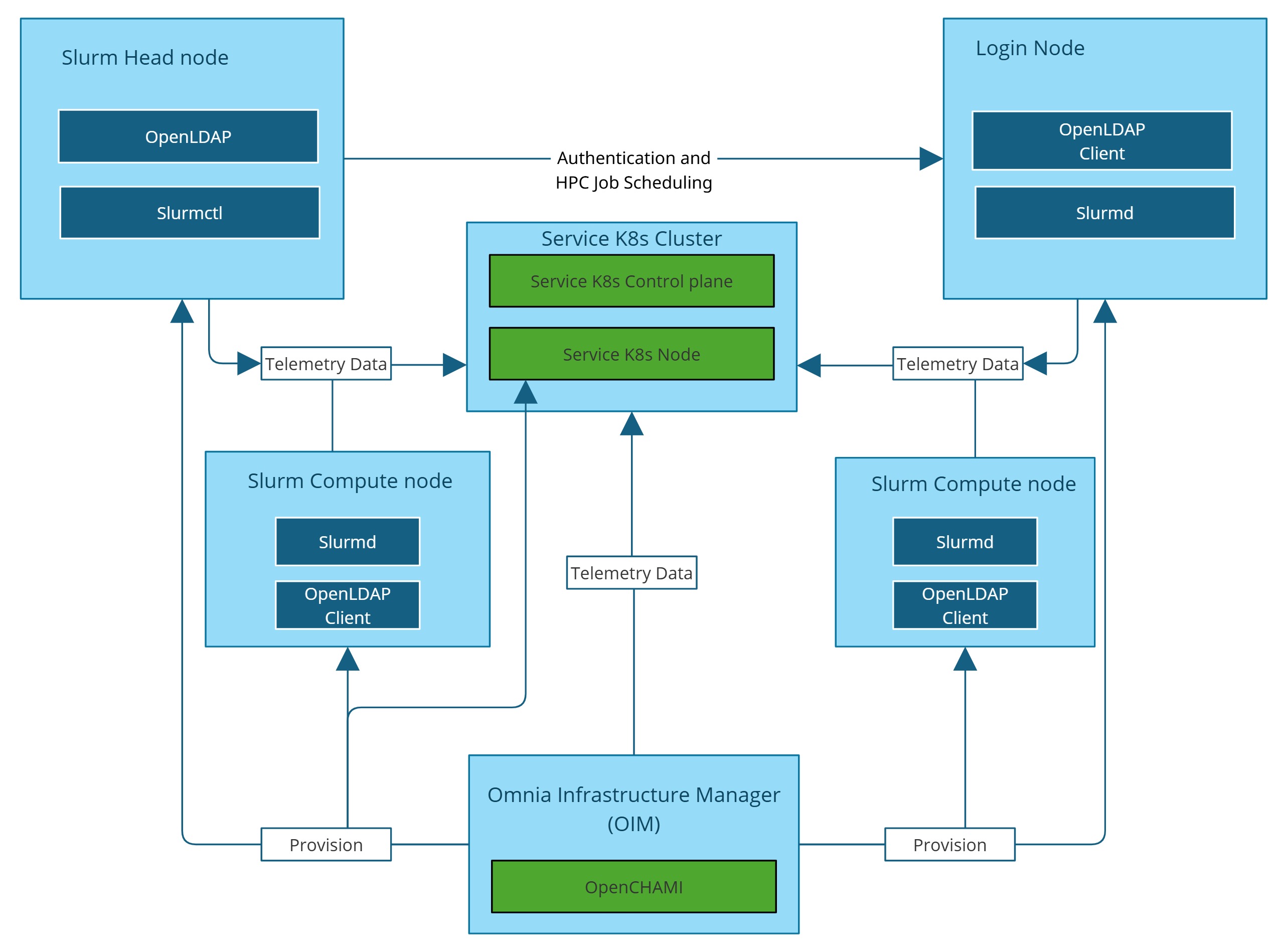
Omnia performs bare metal configuration to enable AI/HPC workloads. It uses Ansible playbooks to perform installations and configurations. iDRAC is supported for provisioning bare metal servers. Omnia installs xCAT to enable provisioning of clusters via PXE in different ways:
Mapping file [Mandatory]: To dictate IP address/MAC mapping, a host mapping file can be provided.
Omnia can be installed via CLI only. Slurm and Kubernetes are deployed and configured on the cluster. OpenLDAP is installed for providing authentication.
To perform these configurations and installations, a secure SSH channel is established between the management node and the following entities:
slurm_control_nodeslurm_nodelogin_node
Authentication
Omnia adheres to a subset of the specifications of NIST 800-53 and NIST 800-171 guidelines on the OIM and login node.
Omnia does not have its own authentication mechanism because bare metal installations and configurations take place using root privileges. Post the execution of Omnia, third-party tools are responsible for authentication to the respective tool.
Cluster authentication tool
In order to enable authentication to the cluster, Omnia installs OpenLDAP: an open source tool providing integrated identity and authentication for Linux networked environments. As part of the HPC cluster, the login node is responsible for configuring users and managing a limited number of administrative tasks. Access to the manager/head node is restricted to cluster administrators only.
Note
Omnia does not configure OpenLDAP users or groups.
Authentication types and setup
Key-Based authentication
Use of SSH authorized_keys
A password-less channel is created between the management station and compute nodes using SSH authorized keys. This is explained in the Security Controls Map.
Login security settings
User needs to provide the following credentials during cluster configuration. Once these credentials are provided, Omnia stores them in an encrypted Ansible Vault in input/omnia_config_credentials.yml. They are hidden from external visibility and access.
iDRAC/BMC (Username/ Password)
Provisioning OS (Password)
slurmdb_password (Password)
DockerHub (Username/Password)
OpenLDAP (
openldap_db_username,openldap_db_password,openldap_config_username,openldap_config_password,openldap_monitor_password)Telemetry (
mysql_user,mysql_password,mysql_root_password)Minio s3 bucket (Password)
Pulp (Password)
Authentication to external systems
Third party software installed by Omnia are responsible for supporting and maintaining manufactured-unique or installation-unique secrets.
Network security
Omnia configures the firewall as required by the third-party tools to enhance security by restricting inbound and outbound traffic to the TCP and UDP ports.
Network exposure
Omnia uses port 22 for SSH connections, same as Ansible.
Firewall settings
Omnia configures the following ports for use by third-party tools installed by Omnia.
Ports used by Podman container and services
Port
Protocol
Container Name/Service
2222
TCP
omnia_core
2226
TCP
omnia_kubespray
2225
TCP
pulp
5001
TCP
Omnia nerdctl registry
Kubernetes ports requirements
Port
Number
Layer 4
Protocol Purpose Type of Node
6443
TCP
Kubernetes API
server Manager
2379-2380
TCP
etcd server
client API Manager
10251
TCP
Kube-scheduler Manager
10252
TCP
Kube-controller manager
Manager
10250
TCP
Kubelet API
Compute
30000-32767
TCP
Nodeport services
Compute
5473
TCP
Calico services
Manager/Compute
179
TCP
Calico services
Manager/Compute
4789
UDP
Calico services
Manager/Compute
8285
UDP
Flannel services
Manager/Compute
8472
UDP
Flannel services
Manager/Compute
Slurm port requirements
Port
Number
Layer 4
Protocol Node
6817
TCP/UDP
Slurmctld Port
Manager
6818
TCP/UDP
Slurmd Port
Compute
6819
TCP/UDP
Slurmdbd Port
Manager
OpenLDAP port requirements
Port Number
Layer 4
Purpose
Node
80
TCP
HTTP/HTTPS
Manager/ Login_Node
443
TCP
HTTP/HTTPS
Manager/ Login_Node
389
TCP
LDAP/LDAPS
Manager/ Login_Node
636
TCP
LDAP/LDAPS
Manager/ Login_Node
Telemetry ports
Port Number
Protocol
Service
8161
TCP
Activemq console
61613
TCP
Activemq message broker
3306, 33060
TCP
Mysql
9092-9093
TCP
Kafka
2112
TCP
Prometheus exporter
9090
TCP
Prometheus server
OpenCHAMI ports
Port number
Protocol
Service Name
9000, 9001
tcp
minio-server
5000
tcp
registry
9000
tcp
step-ca
5432
tcp
postgres
27779
tcp
smd
27778
tcp
bss
80, 443
tcp
haproxy
22
udp
ssh-udp
67
udp
dhcp-udp
68
udp
bootpc
69
udp
tftp-udp
Data security
Omnia does not store data. The passwords Omnia accepts as input to configure the third party tools are validated and then encrypted using Ansible Vault. Run the following commands routinely on the OIM for the latest RHEL security updates.
yum update --security
For more information on the passwords used by Omnia, see Login Security Settings.
Auditing and logging
Omnia creates and stores log files related to containers at <nfs_share_path>/omnia/log/. The events during the installation of Omnia are captured as logs. For different roles called by Omnia, separate log files are created as listed below:
Location |
Purpose |
|---|---|
/opt/omnia/log/core/playbooks/discovery.log |
Discovery logs |
/opt/omnia/log/core/playbooks/local_repo.log |
Local Repository logs |
/opt/omnia/log/core/playbooks/prepare_oim.log |
Prepare OIM Logs |
/opt/omnia/log/core/playbooks/provision.log |
Provision Logs |
/opt/omnia/log/core/playbooks/scheduler.log |
Scheduler Logs |
/opt/omnia/log/core/playbooks/telemetry.log |
Telemetry logs |
/opt/omnia/log/core/playbooks/utils.log |
Utility logs |
/opt/omnia/log/core/playbooks/credential_utility.log |
Credential utility logs |
/opt/omnia/log/openchami/*log |
OpenCHAMI playbook logs |
/opt/omnia/log/pulp/*log |
Pulp container logs |
/opt/omnia/log/local_repo/*log |
Local repo logs |
/opt/omnia/log/kubespray/*log |
Kubespray logs |
/opt/omnia/log/core/container/*log |
Core container logs |
/opt/omnia/log/core/playbooks/validation_omnia_project_default.log |
Omnia input validation report logs |
/opt/omnia/log/core/playbooks/input_validation.log |
Omnia input validation playbook logs |
Additionally, an aggregate of the events taking place during storage, scheduler and network role installation called omnia.log is created in /var/log.
There are separate logs generated by the third party tools installed by Omnia.
Logs
A sample of the omnia.log is provided below:
2021-02-15 15:17:36,877 p=2778 u=omnia n=ansible | [WARNING]: provided hosts
list is empty, only localhost is available. Note that the implicit localhost does not
match 'all'
2021-02-15 15:17:37,396 p=2778 u=omnia n=ansible | PLAY [Executing omnia roles]
************************************************************************************
2021-02-15 15:17:37,454 p=2778 u=omnia n=ansible | TASK [Gathering Facts]
*****************************************************************************************
*
2021-02-15 15:17:38,856 p=2778 u=omnia n=ansible | ok: [localhost]
2021-02-15 15:17:38,885 p=2778 u=omnia n=ansible | TASK [common : Mount Path]
**************************************************************************************
2021-02-15 15:17:38,969 p=2778 u=omnia n=ansible | ok: [localhost]
These logs are intended to enable debugging.
Note
The Omnia product recommends that product users apply masking rules on personal identifiable information (PII) in the logs before sending to external monitoring applications or sources.
Logging format
Every log message begins with a timestamp and also carries information on the invoking play and task.
The format is described in the following table.
Field |
Format |
Sample Value |
|---|---|---|
Timestamp |
yyyy-mm-dd h:m:s |
2/15/2021 15:17 |
Process Id |
p=xxxx |
p=2778 |
User |
u=xxxx |
u=omnia |
Name of the process executing |
n=xxxx |
n=ansible |
The task being executed/ invoked |
PLAY/TASK |
PLAY [Executing omnia roles] TASK [Gathering Facts] |
Error |
fatal: [hostname]: Error Message |
fatal: [localhost]: FAILED! => {“msg”: “lookup_plugin.lines} |
Warning |
[WARNING]: warning message |
[WARNING]: provided hosts list is empty |
Network vulnerability scanning
Omnia performs network security scans on all modules of the product. Omnia additionally performs Blackduck scans on the open source softwares, which are installed by Omnia at runtime. However, Omnia is not responsible for the third-party software installed using Omnia. Review all third party software before using Omnia to install it.
If you have any feedback about Omnia documentation, please reach out at omnia.readme@dell.com.