Retry BuildStreaM Pipelines
Overview
Retry a BuildStreaM pipeline when one or more stages have failed. Before retrying, identify and resolve the issue that caused the failure.
A retry of a downstream GitLab pipeline and a new catalog-mode build are
different operations. A new build can reuse valid functional-group artifacts
from the global image dictionary when build_image.force_rebuild is false.
That reuse behavior does not provide automatic rollback for an individual
failed GitLab stage.
Warning
Do not cancel a running GitLab pipeline or stage. Cancellation prevents some pipeline steps from executing, which leaves the BuildStreaM job in an intermediate, inconsistent state.
Prerequisites
- A Job exists with one or more stages in
FAILEDstate - The issue that caused the failure has been identified and resolved
- Configuration files (PXE mapping and input files) have been corrected if needed
Procedure
-
Navigate to Build → Pipelines and identify the failed pipeline.
-
Identify the stage that failed and review the error logs.
-
Resolve the issue that caused the failure:
- Fix configuration errors if present.
- Resolve network connectivity issues.
- Clear resource constraints if applicable.
- Address any other specific error conditions.
-
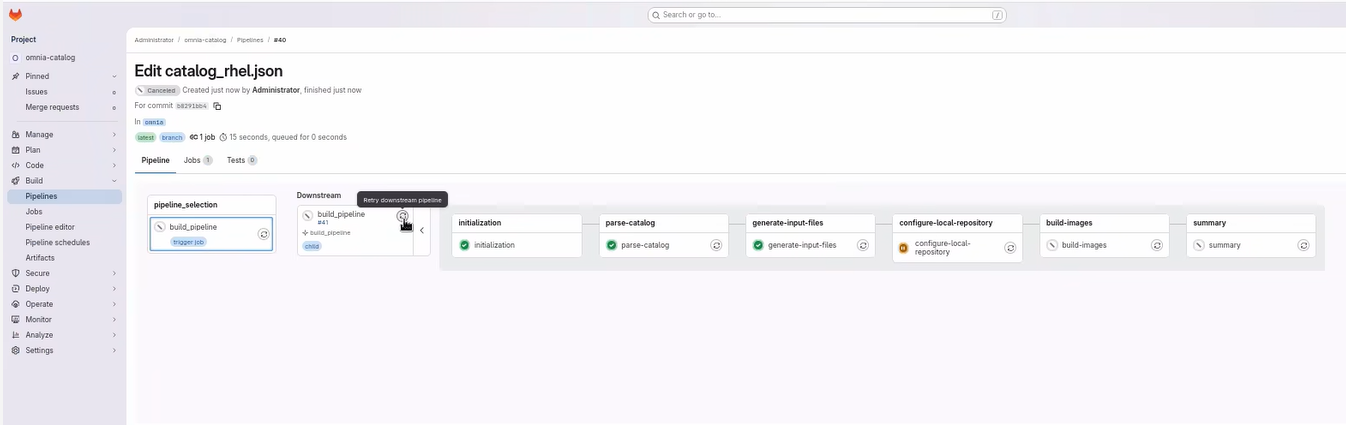
From the parent pipeline, retry the failed downstream pipeline so that the complete child pipeline is created again.
Note
Retry the complete downstream pipeline rather than invoking an individual BSM stage again. The source creates a new BSM Job for a new build child pipeline. Build and deploy stages also refresh their module input files from the current branch when
GITLAB_API_TOKENis configured. -
Verify that the pipeline completes successfully.
Verification
-
Check the GitLab pipeline status to ensure all stages passed.
-
Verify that a new Pipeline ID is created for the retry operation.
-
For build pipelines, verify that images were created successfully.
For a new catalog-mode build, review the job log for dictionary hits and verify the recorded S3 objects when an existing functional-group image was reused.
-
For deploy pipelines, verify that nodes were deployed correctly.
-
Compare results with the original failed pipeline to confirm the issue is resolved.
Next steps
- Execute Deploy Pipeline -- Deploy pipeline operations
- Cleanup Operations -- Remove old Image Groups
Troubleshooting
- The corrected input is not used: Confirm that
GITLAB_API_TOKENis configured and that the correction was committed to the current branch. Without the token, the source skips its latest-file refresh. - A BSM stage returns a state conflict: Retry the complete downstream pipeline so the supported stage sequence starts with a new BSM Job.
- A new build does not reuse an existing image: Confirm that
build_image.force_rebuildisfalseand that the dictionary entry's kernel, initramfs, and root filesystem objects still exist. Missing objects cause a rebuild. - A cadence retry starts without repository reconciliation: Manual
PIPELINE_TYPE=cadenceexecution starts the unified pipeline directly. The periodic watcher owns the reconciliation and package-change decision. - For additional issues, see BuildStreaM troubleshooting.